New Guide: Importing Dives from Shearwater Cloud
2026-09-18 · DiveHub Team
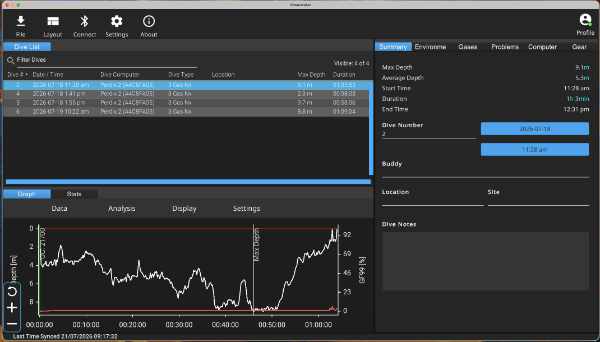
If you dive with a Shearwater Research computer — a Perdix, Teric, Peregrine, or any of the others — your dive log already lives in the Shearwater Cloud app. Good news: you don't have to re-type any of it to get it into DiveHub.
We've published a new guide, Exporting Dives from Shearwater Cloud, that walks through exporting your dives from the Shearwater Cloud desktop app as a UDDF or DL7 file, and then importing that file straight into DiveHub.
How it works
- Open Shearwater Cloud on your desktop and select the dive(s) you want to bring across.
- Export them as a UDDF or DAN DL7 file from the File menu.
- In DiveHub, tap Add Dive → Import file and choose the file you just exported.
- DiveHub reads the depth, time, temperature, and profile data automatically — you just fill in the details it can't know, like the dive site.
This is on top of our existing support for importing UDDF and DL7 files from any other dive log software that exports them — see Importing Dives for the general walkthrough, and the UDDF and DL7 format pages for more background on each format.
Have a dive computer or dive log app you'd like a guide for? Let us know.