DiveHub Now Supports Shearwater XML Files
2026-09-21 · DiveHub Team
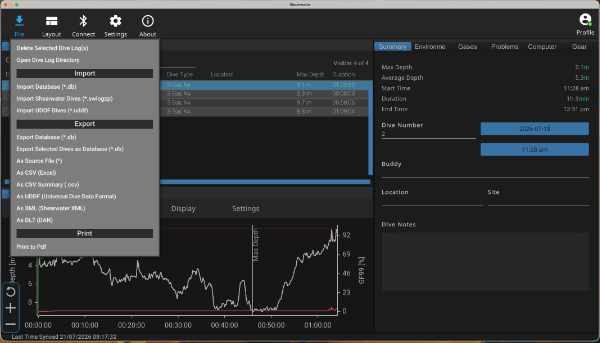
Diving with a Shearwater computer? DiveHub can now import Shearwater XML, the native dive log format used by Shearwater Cloud, alongside the UDDF and DL7 files we already supported.
What's new
Until now, Shearwater divers had to export as UDDF or DL7. Now you can pick Shearwater XML from the Shearwater Cloud export menu and upload the resulting .xml file directly to DiveHub. DiveHub fills in the dive number, date, depth, time, temperature, gas, dive computer details, and profile data for you.
How it works
- Open Shearwater Cloud on your desktop and select the dive(s) you want to bring across.
- Choose File → Export and pick Shearwater XML.
- In DiveHub, tap Add Dive → Import file and choose the file you just exported.
- Add the details Shearwater can't know, like the dive site, and tap Save.
Anything you've already entered by hand is kept when you import a file.
UDDF files also end in .xml. You don't need to tell DiveHub which kind you have: it checks the contents of the file and reads it correctly either way.
Learn more
Our new guide, Importing a Shearwater XML File, covers the steps in detail. For the other export options, see Exporting Dives from Shearwater Cloud and the general Importing Dives walkthrough.
Have a dive computer or dive log app you'd like us to support? Let us know.